
Keep the promises you make before the market opens.
Every trader starts the day with good intentions. Zenk Guard helps you stay committed to the trading plan you created while thinking clearly — not the one your emotions create later.
Get Zenk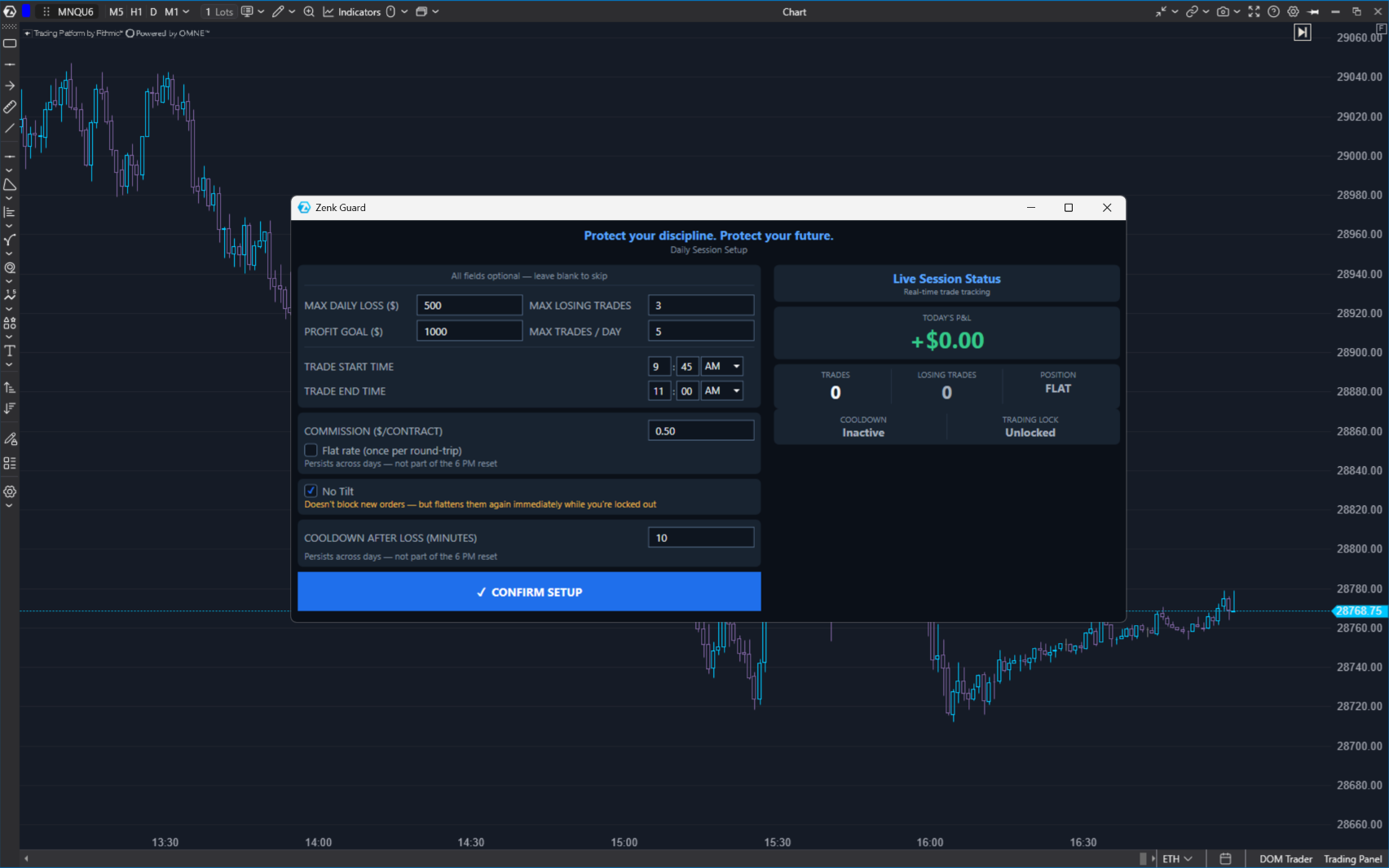
Why Zenk Guard Exists
Most traders already know their rules. Don't overtrade. Don't revenge trade. Don't oversize. Stop after your daily loss.
The problem isn't knowing what to do. The problem is following those rules when emotions take over.
Why this matters
Fear. Greed. Frustration. Tilt.
In those moments, the trading plan you created before the session is often replaced by decisions you never intended to make.
Zenk Guard was built to protect the commitments you made while thinking clearly. Not by telling you how to trade. By helping you follow the plan you already believe in.
Discipline isn't built in the middle of a trading session. It's protected there.
How Zenk Guard Works
Set your rules
max daily loss · max losing trades · max trades · trading hours · profit goal · Loss Cooldown (a mandatory pause after a losing trade before trading again) · No Tilt (automatically flattens any new position if you continue trading after breaching your limits).
Confirm your setup
rules locked for the session. This is intentional: it prevents emotional decisions from changing the commitments you made while thinking clearly.
Trade normally
Guard stays quietly in the background, monitoring fills, realized session P&L, and the rules you chose. For Maximum Daily Loss and Profit Goal, it also checks open-position P&L in the background. It doesn't interfere unless one of your rules is breached.
If a rule is breached
depending on setup: Loss Cooldown timer · lock new trading · No Tilt flatten. Every action is based on the commitments you chose before the session began.
You decide the rules. Guard holds you to them.
Built for Real Trading
Every trader is different. Guard was never designed to tell you how to trade. The trader decides every rule. Guard only activates when you've crossed a line you chose while thinking clearly.
Your strategy stays yours. Your discipline no longer depends on willpower alone.
Know Exactly What Guard Can—and Cannot—Do
Most trading software tells you what it does. Very little tells you exactly how it does it. We think experienced traders deserve that honesty.
Zenk Guard cannot stop an order before it reaches the exchange.
That's not how ATAS works. Instead, Guard reacts after orders reach the market.
If Maximum Daily Loss is breached, Guard submits a separate market order to flatten the position. Profit Goal, Maximum Losing Trades, and Maximum Trades lock new trading without flattening the position. If No Tilt is enabled and a new position is opened while trading is locked, Guard submits a separate market order to flatten that position.
That flatten is a real market order. It isn't a cancellation. It isn't simulated. It follows the same market conditions as every other order you place. That means normal commissions and market movement still apply.
See exactly how Guard reacts
It monitors fills as they occur and, once per second, checks Maximum Daily Loss and Profit Goal using realized session P&L plus any open-position P&L.
We'd rather be completely transparent than make promises no software can keep.
If reality is strong enough, there is no need to exaggerate it. That's how we built Zenk Guard.
Everything Included
Every rule is optional. Enable only what fits your trading.
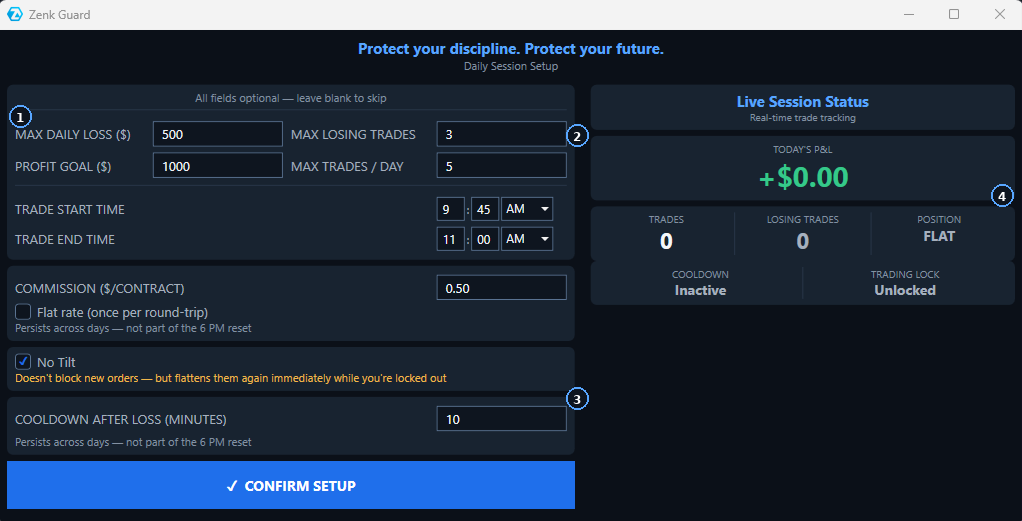
- Protect your daily risk — Maximum Daily Loss · Maximum Losing Trades.
- Control your trading activity — Profit Goal · Maximum Trades · Trading Hours.
- Prevent emotional decisions — Loss Cooldown · No Tilt.
- Know exactly where you stand — Today's P&L · Trades · Losing Trades · Position · Cooldown · Trading Lock.
Real Trading Example
At 9:36:46 AM ET, the trader locked in the day's rules. Maximum Trades was set to 3, Loss Cooldown to 5 minutes, and the trading window ended at 11:00 AM ET.
Those rules could not be changed until 6:00 PM ET.
What follows is one real trading session. Zenk Risk is the position-sizing plugin included in the same subscription, and when a trade is placed through it, the bracket orders are placed automatically.
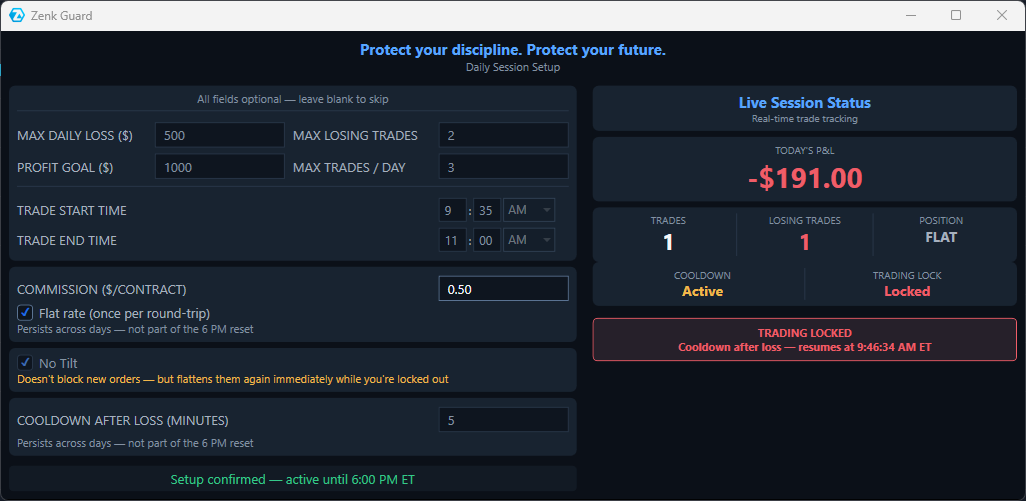
09:41:37 AM ET — After the first losing trade, the session was down $191.00. The 5-minute Loss Cooldown activated and Guard locked trading until 9:46:34 AM ET.
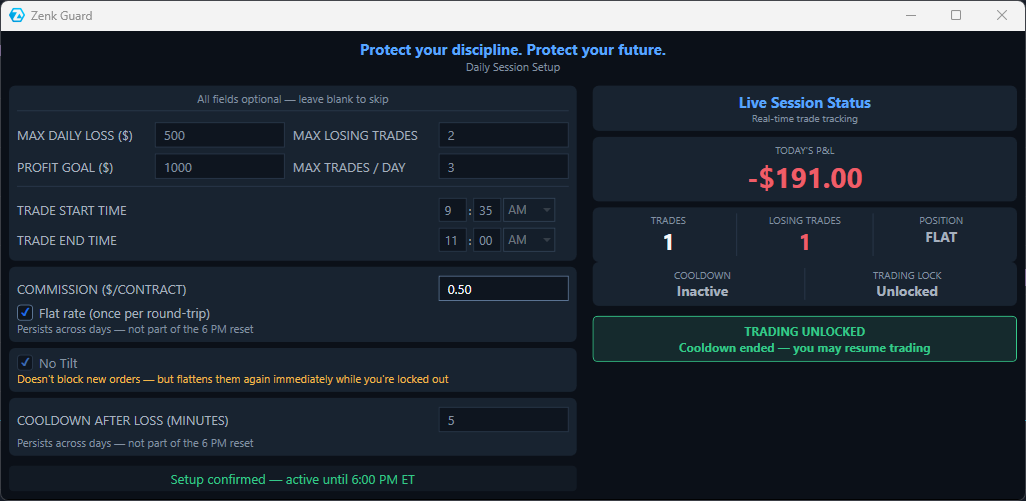
09:47:39 AM ET — The cooldown ended and Guard unlocked trading. The pause was over, and the trader could resume under the same rules already locked for the day.
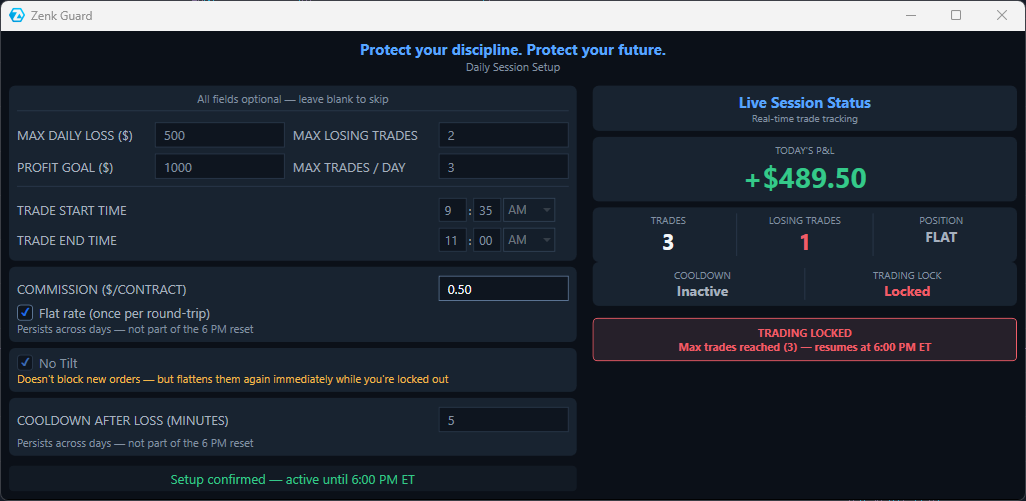
10:53:09 AM ET — Trade 3 reached the Maximum Trades limit. Guard entered Trading Locked until 6:00 PM ET — even with the session up $489.50.
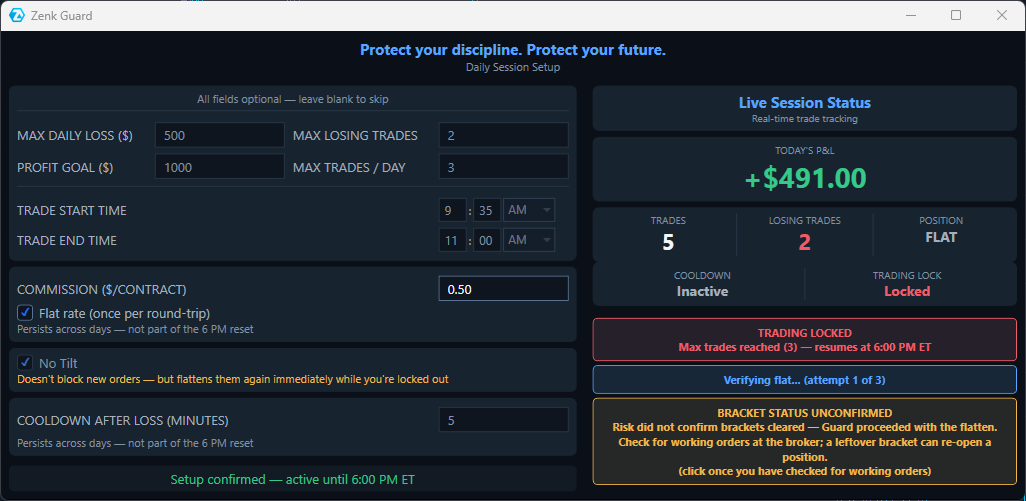
10:55:21 AM ET — A new position was opened while trading was already locked. No Tilt reacted and proceeded with the flatten.
That flatten is a real market order, so normal commissions and market movement still apply. It also counts as trading activity, which is why the counters can continue rising after the original Maximum Trades limit has already been reached.
Guard could not confirm that the brackets were cleared, so it told the trader to check for working orders at the broker. A leftover bracket can re-open a position.
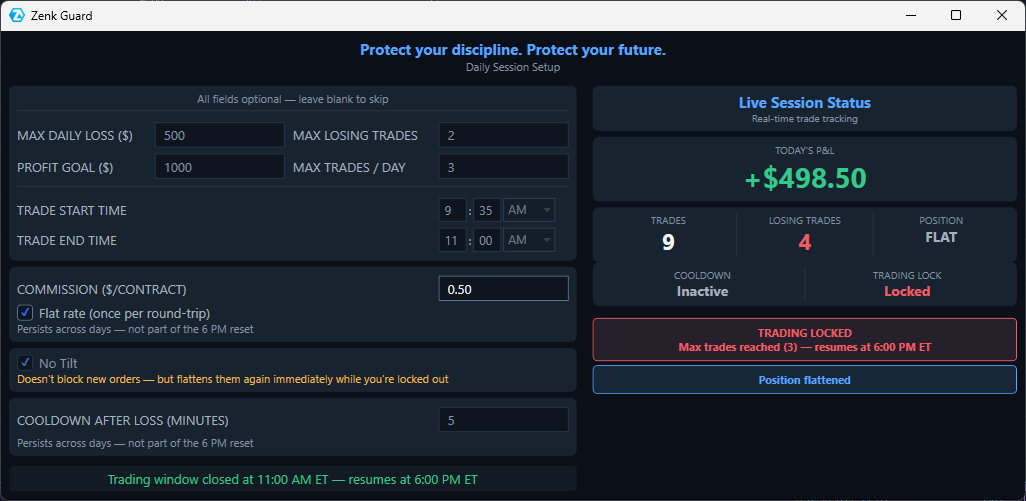
11:02:12 AM ET — The session remained locked because the Maximum Trades limit had already been reached. The trading window had also closed at 11:00 AM ET.
Guard kept the actual lock reason visible while separately showing that the trading window was closed.
That is the commitment Guard is built to protect: the rules do not move with the trader's emotions.
When the limit was reached, Guard entered Trading Locked. When a new position appeared during the lock, No Tilt reacted. And when bracket status could not be confirmed, Guard said so instead of pretending otherwise.
Ready to protect the rules you set before the session?
Set your limits while you're thinking clearly. Let Zenk Guard hold you to them when emotions take over.
Get Zenk