
Know your risk before you enter the trade.
Before you place a trade, Zenk Risk calculates your exact position size based on your account size, your chosen risk, and your stop loss. No guessing. No mental math. Just the position size you need before you click Buy or Sell.
Get Zenk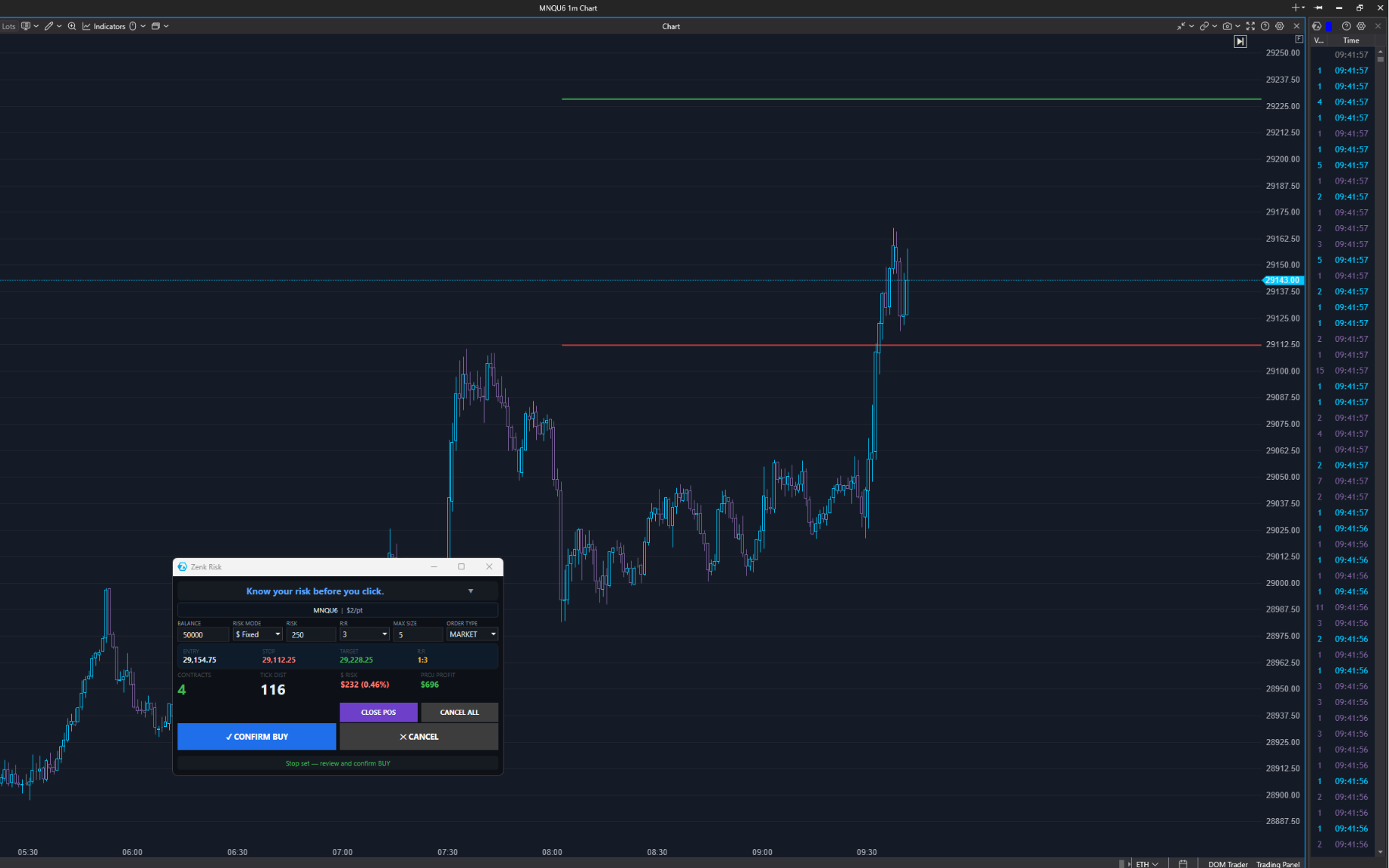
Why Zenk Risk Exists
Most traders don't lose because they can't find entries. They lose because they risk too much on the wrong trade.
One oversized position. One emotional decision. One trade that was bigger than it should have been. That's often all it takes.
Zenk Risk was built to solve that problem. Before you enter a trade, it gives you the one number that matters: your exact position size.
It doesn't tell you where to enter. It doesn't tell you where to exit. It simply helps you manage your risk before the trade begins.
How Zenk Risk Works
Before you place a trade, set two things: how much you're willing to risk, and where your stop belongs. Zenk Risk handles everything else.
Click Buy or Sell, and the panel asks you to place your stop on the chart. Your stop goes where your trading plan says it belongs, not where the math forces it. Zenk Risk instantly calculates your exact position size and updates the trade details — entry, stop, target, contracts, total risk — before anything is sent.
Using Limit or Stop orders? Place your entry on the chart first, then your stop. Everything else works the same way.
Zenk Risk doesn't change your strategy. It works alongside the trading plan you already have, so you always know your exact risk before the market sees your order.
Build Every Trade with Confidence
Risk management should never depend on mental math.
Inputs (what you already know): account balance · chosen risk (fixed or percentage) · stop loss.
From there, Zenk Risk instantly calculates your position size and updates your trade details — including dollar risk, tick distance, and projected profit — before anything is sent to the market.
Zenk Risk simply does the math — consistently, accurately, and before you commit to the trade.
Everything You Need Before the Trade
Everything you need to manage your risk before entering a trade.
- Position size calculated automatically
- Risk by fixed dollar amount or account percentage
- Market, Limit, and Stop order support
- Complete trade preview before execution — entry, stop, target, contracts, and total risk
- Built-in trade confirmation
- Automatic bracket order placement
Native ATAS integration — no separate application required.
Every feature exists for one reason: to help you know your exact risk before you enter the trade.
See the Workflow Step by Step
Set your risk
Panel waiting
Place your stop
Instant calculation
Review before you commit
Position size, entry, stop, target, dollar risk, tick distance, R:R
Trade placed
Bracket live
Every screenshot on this page shows a real trade using Zenk Risk inside ATAS. Nothing has been recreated or simulated for marketing purposes.
Ready to know your risk before every trade?
Stop guessing your position size. Know your exact risk before you enter the market.
Get Zenk